

Databricks Lakehouse Platform


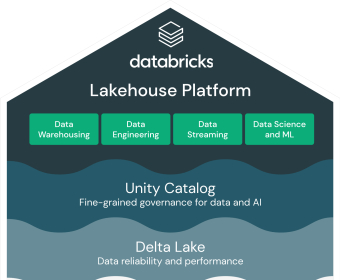
Start by landing data where everyone can use it. Connect cloud storage or databases, then use Auto Loader to continuously ingest files without manual schema wrangling. Define schema inference and schema evolution rules, and write everything to Delta tables so changes, time travel, and ACID operations are handled for you. For event streams, set up Structured Streaming with checkpoints and exactly-once semantics. Schedule ingestion with Jobs, parameterize runs for each environment, and track latency and throughput so you know when to scale.
Build reliable pipelines next. Work in notebooks with SQL, Python, or Scala side by side to explore, profile, and transform. Promote your code into Delta Live Tables to declare transformations and data quality expectations; failed rows get quarantined, healthy data moves forward. Optimize tables (OPTIMIZE, ZORDER) and set retention policies. Use Repos for Git-based workflows, add unit tests, and wire CI/CD to deploy pipelines through dev, staging, and prod. Govern everything with Unity Catalog: define catalogs and schemas, set granular permissions, and trace lineage from dashboards back to sources for audit and impact analysis.
Turn finished datasets into answers. Spin up SQL Warehouses, write queries that combine batch and streaming tables, and build dashboards with filters and alerts so stakeholders get updates as data changes. Create parameterized queries for ad hoc what-if analysis. Tag queries, share saved views, and use query history to iterate quickly. Connect Power BI or Tableau to a SQL endpoint when teams prefer familiar tools, and apply usage limits and auto-stop to manage spend without blocking users.
Move from insights to models without switching platforms. Engineer features with Spark, publish them to Feature Store, and keep training and inference consistent. Track experiments and metrics with MLflow; compare runs, register the best model, and manage versions and approvals. Automate training with Workflows (daily retrains, drift checks), then expose real-time predictions through Model Serving or run batch scoring on Delta tables. Monitor latency, throughput, and accuracy, and roll back safely if a new version underperforms. With this flow, data engineers, analysts, and data scientists work in one place—from ingestion to dashboards to production ML—without glue code or handoffs slowing things down.
Databricks Lakehouse Platform
Custom
Approach Simplifies
Separate analytics
BI
Data science
Machine learning
Analytics and AI initiatives
Open foundation
Avoid proprietary walled gardens
Easily share data
Build modern data stack
Open source data projects
Consistent management
Security
Governance experience
Insights


Comments